
Citizen Portal settings
Is this service available in the app?
This service is available on the Citizen's Portal mobile app, so you can use it directly.


How to do it
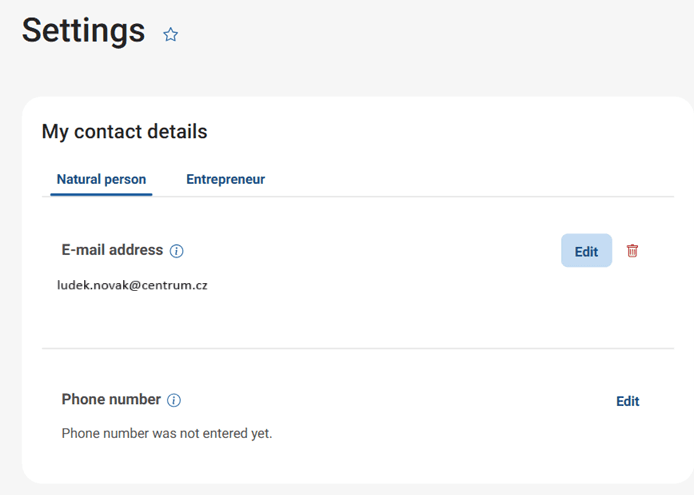
Click on "More" to expand the menu that hides your profile settings in the Citizen Portal. In the first place you will find your contact details, which you can add your email and phone number. The portal will then send you notifications to these contacts, the scope of which you can set just below the contacts.
In the settings you will also find the option to manage the connected databox. You can set up notifications for new messages, either by SMS or email. The citizen portal can also forward the entire data message to you. In this case, however, the message is considered read and you lose the 10-day legal deadline. If you are not satisfied with the data message in the Citizen Portal for any reason, you can also disconnect it from there.
What to be aware of
If you activate the function of forwarding data messages to your email, pay special attention to the legal deadlines. This feature will cause forwarded messages to be considered delivered and therefore read. This includes messages that normally have a 10-day delivery period.
You can edit your contact details in the Citizen Portal settings. The ability to edit contact details is only available to users logged in via Citizen Identity.
Where can I find more detailed information on filling in my contact details in the Civil Registry and the Register of Persons?
The procedure for filling in your contact details can be found in the article Entering contact details in the Civil registry and the Register of Persons.
How does the notification system in the Citizen Portal work?
In the Citizen's Portal itself, you will see the new notification automatically. If you would like to receive notifications by email or SMS, just set this option in the Citizen Portal.
Is there a charge for sending notifications?
Sending notifications by SMS or e-mail is free of charge.