Mobile app download and registration
Is this service available in the app?
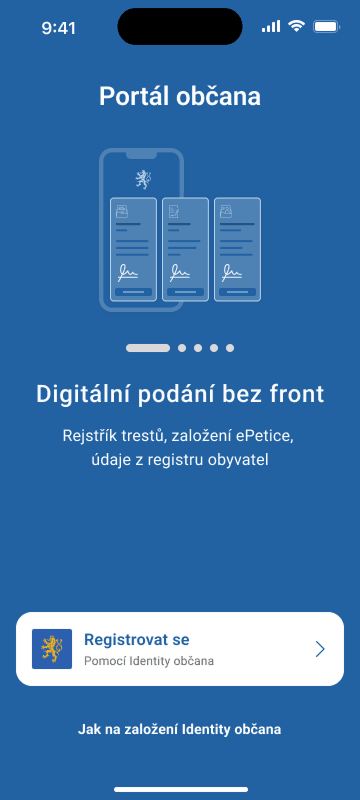
This service is available on the Citizen's Portal mobile app, so you can use it directly.


Where to download the app
The app is available for both iOS and Android users and can be downloaded from the App Store or Google Play.


What you need
-Smart mobile phone (with Android version 10 and above or iOS version 15 and above) with internet access and lock code set
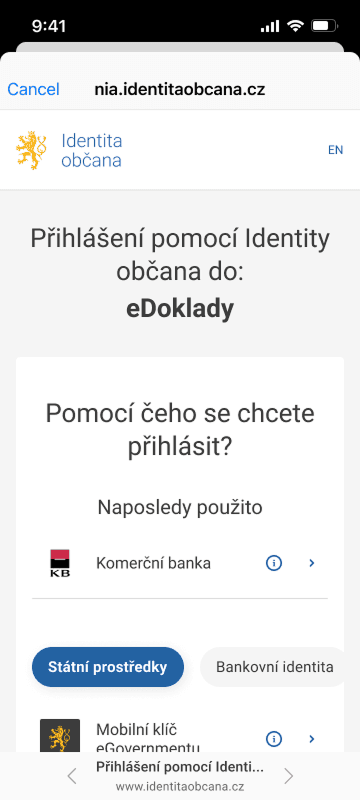
- Citizen Identity login (eGovernment Mobile Key, NIA ID, Bank Identity, mojeID and other identification means)
- Default browser set to MS Edge, Google Chrome or Safari
How to do it
Install the Citizen Portal app on your phone. When you open the app, select Sign in with Citizen Identity and select the login you want to use to sign in as you are used to.
If you use eGovernment Mobile Key or another mobile app to log in with Citizen Identity, make sure your internet browser settings allow you to open external apps.
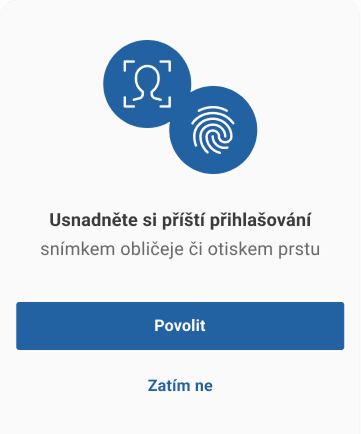
After the initial registration to the Citizen Portal, you must make sure to secure the application. If your mobile phone allows secure biometric authentication (facial recognition or fingerprint scanning), the app will prompt you to enable biometrics. In addition to getting a solid level of security for your data, you'll also make it easier to log in in the future.
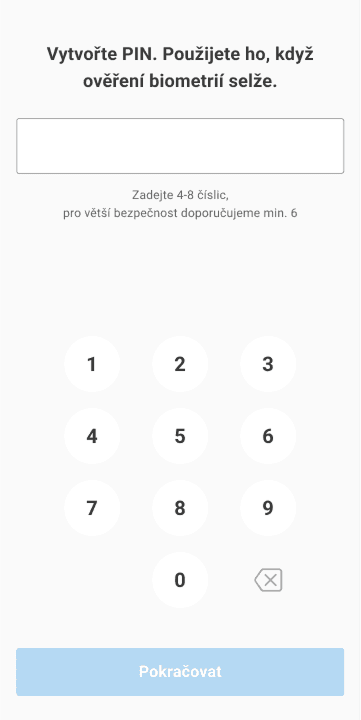
Whether you enable biometrics or not, you also need to set up a numeric PIN. This will be used to log in to the app, or for times when biometric authentication fails. The PIN must be at least four digits, but for security reasons, we recommend a six- to eight-digit PIN. You must enter the PIN twice in a row for verification. Consecutive numbers (e.g. 222222) or simple consecutive number sequences (1234, etc.) are not allowed. The system will not allow you to enter a similar, easily identifiable PIN.
Now you are done and can make full use of the Citizen Portal on your mobile phone.