
Motor Vehicles Register
Is this service available in the app?
This service is available on the Citizen's Portal mobile app, so you can use it directly.


What you need
- Being a natural person, not a legal entity (corporation, foundation, etc.)
- Citizen identity for logging into the Citizen Portal
How to do it
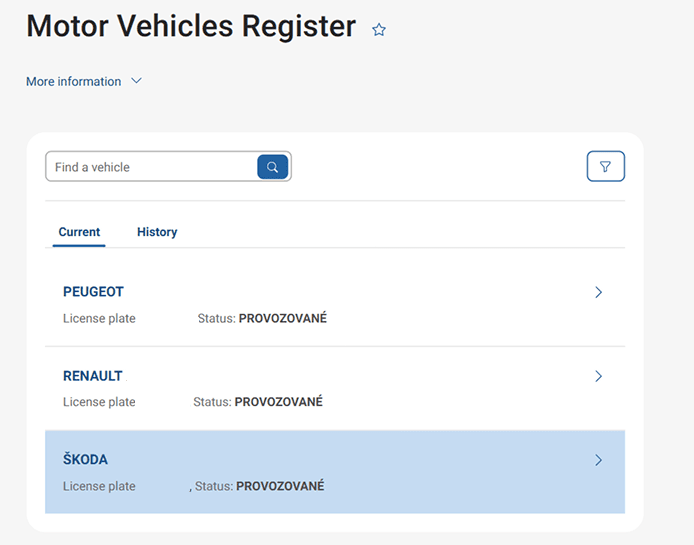
Log in to the Citizen Portal, type "Motor Vehicles Register" in the search box and click on it in the list below. You will see a list of the vehicles you currently operate or own. You will then find the vehicles you previously owned or operated under the History tab.
You may be also interested in
Where is the data being extracted from?
The Citizen's Portal displays information and data on vehicles linked to a specific user or entity that are registered in the Motor Vehicle Register. This functionality aims to provide the user of the Citizen Portal with his/her data recorded in the Motor Vehicle Register on vehicles owned or operated by him/her, both currently and in the past.
What to do if some of the data does not reflect reality?
If you find a discrepancy in the records, contact the local authority of the municipality with extended jurisdiction. Take with you the documents that support the incorrectly presented data. You can download or print the summary directly from your web browser to obtain an informative record. The data from the Motor Vehicle Register cannot currently be complained about or changed electronically or via the Citizen's Portal application.
List of local authorities with extended jurisdiction (only in Czech).
How long will it take to see my updated data in the Citizen Portal?
The updated data in the Motor Vehicle Register will be displayed in the Citizen Portal the day after the change is made.
Are there any STK records in the data displayed?
Yes, there is a link in the Vehicle Details under the Technical Inspections tab to view a list of vehicle inspections at Technical Inspection Stations (STK) and Emission Measurement Stations (SME), including the odometer values. Using the Inspection Detail button, you can view the result of the inspection and any defects detected.
Can I download an electronic record of my vehicle registration?
Currently, the service of downloading an electronic record from the vehicle register is in the preparation stage. The summary of the data from the Motor Vehicle Register displayed is not meant for printing, therefore it cannot be fully optimised for printing. To obtain an informative record, the user can print the summary directly from the web browser. In the next phase of the project, the data will be output to a signed PDF document. Update on obtaining a vehicle register extract.
Where and how can I register my new vehicle?
For full details, see Procedures for registering a new or imported vehicle.
Where and how can I report a change of ownership?
More detailed information can be found in the article Recording a change of vehicle owner in the Motor Vehicle Register and on the website of the Ministry of Transport.
Where can I find more detailed information and the various services on this register?
For a more detailed list of services and tasks for this register, please visit portal.gov.cz or the Ministry of Transport or contact the Transport Portal Customer Centre.