
Non-public record from the Trade Register
Is this service available in the app?
This service is available on the Citizen's Portal mobile app, so you can use it directly.


What you need
- Be an Entrepreneurial natural person or own-account worker (OSVČ)
- Citizen identity for logging into the Citizen Portal
How to do it
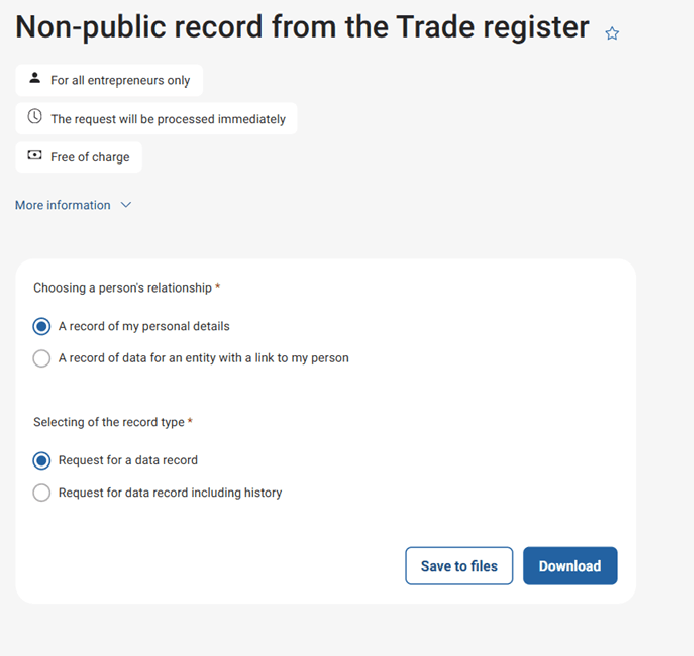
Log in to the Citizen Portal and search for "Non-public record from the Trade Register".
Select the relationship to the person and the type of record from the list. Click "Download" to download the record to your computer in no time.
You may be also interested in
Where can I find more detailed information?
In the article Providing records from the Trade Register.
Which authority administers the register?
The Trade Register, administered by the Ministry of Industry and Trade, is a public administration information system in which data of a statistical and record-keeping nature related to the operation of a trade are recorded. The data from the Trade Register is a public list (except for non-public data on place of residence in the territory of the Czech Republic, birth numbers, fines and sanction measures in connection with business and all data for an entrepreneur from whose last trade licence has expired 4 years).
What is the purpose of this record?
Thanks to the record, you will obtain information about non-public data that are kept about you in the Trade Register.
Where can I make a change in my trade licence?
The relevant information and procedures can be found in the article Change in a trade at the initiative of the entrepreneur or on the Trade Business Portal.
I found discrepancy in the record, who shall I contact?
The incorrect data can be complained electronically in the Data - Register of person section. The complaint process itself is then always handled by the source of the data in question, which is its administrator. In the case of self-employed person engaged in business, one administrator is often responsible for the registration of basic data (registry court, trade licensing department of the municipality, etc.), and another administrator (Ministry of the Interior) is responsible for additional data, e.g. about the data box. Some data may also have more than one possible administrator, and you will be asked to select the one with whom you wish to complain. Upon receipt of the request, the administrator will verify the accuracy of the recorded data without undue delay and, depending on the result, either correct the data or reject the claim. If the requested change has not yet been processed according to the complaint you have submitted, we recommend contacting the administrator directly, i.e. the Trade Licensing Office for self employed in business (e.g. by databox), where the complaint was sent. The user can also report changes to the Trade Register using the Unified Registration Form (JRF) application, which allows applications to be sent via a qualified electronic signature or databox. Alternatively, contact your trade office.