
Notice of document validity
Is this service available in the app?
This service is available on the Citizen's Portal mobile app, so you can use it directly.


If you are a new user, it is very easy to turn on the "Citizen Portal Alerts" feature during initial setup.
If you already use the Citizen Portal and want to turn on the "Citizen Portal Alerts" feature, just go to the settings.
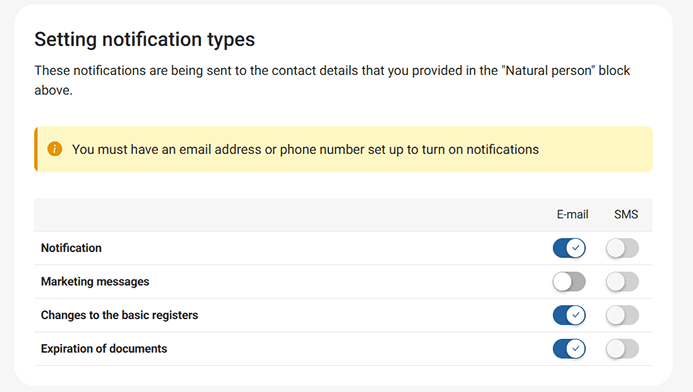
In both cases, you can choose how you want to receive notifications. This can be by email or SMS. The alerts are free of charge, you can change your contacts as you wish, and we will even send them to a foreign number as long as it is from an EU country.
You will be notified three times when the document expires: 30 days in advance, 7 days in advance and then on the expiry date.
What to be aware of
In order to receive notifications, you must have contact details entered in the Citizen Portal, which you will fill in after logging in via Citizen Identity.
Notifications are not sent automatically, but only after the service has been activated.
Where can I set a notification for the expiry of my documents?
In the Settings section, at the center of the screen, there is a matrix of switches for configuring the Citizen Portal notification channels through which the user will be informed. Optionally, notifications via SMS and email can be enabled. Notifications for a logged-in user within the Citizen Portal are always active and therefore not listed here.
Is there a fee for sending notifications?
Notifications from the Citizen Portal are completely free of charge.
To what documents will I receive a notification?
Notifications about the upcoming expiration of state-issued documents. Email notifications are sent 90, 60, and 30 days before the document’s expiration, while SMS messages are sent 60 and 30 days before expiration.
How does the notification system in the Citizen Portal work?
In the Citizen's Portal itself, you will see the new notification automatically. If you would like to receive notifications by email or SMS, just set this option in the Citizen Portal.